One of the most important factors affecting user experience when developing web applications is performance. Ensuring that users have a fast and smooth experience directly affects the success of the application. At this point, the IMemoryCache class used in ASP.NET Core MVC alleviates the database load by providing performance-enhancing solutions. Let's explore how IMemoryCache works and best practice examples.

IMemoryCache What is it?
IMemoryCache is an in-memory caching system in ASP.NET Core that speeds up access time by keeping data in memory (RAM). -memory caching) mechanism. It speeds up the application by keeping frequently used data in memory instead of frequently retrieving data from the database or other sources. This both ensures quick response to user requests and makes it possible to use system resources more efficiently.
What are the Advantages of IMemoryCache?
What are the Advantages of IMemoryCache?
The main advantages of using IMemoryCache can be listed as follows:
- 1. < /span>Reduces Database Load: It reduces intensive operations by keeping the data in memory instead of pulling it from the database with each request.
- 2. Increases Application Performance: The application runs faster, user waiting time is reduced.
- 3. Easy to Use: IMemoryCache is a tool that comes ready-made in ASP.NET Core and does not require configurations

How to Use IMemoryCache?
To use IMemoryCache, we first need to add it as a service by going to the application's Startup.cs file. This works with dependency injection, meaning IMemoryCache can be easily accessed in the controller or service class .
1. Initial Settings
To use IMemoryCache ConfigureServices method, add the following line:

2. IMemoryCache Injection in Controller
Then, you can cache the data using IMemoryCache in the controller class you want:
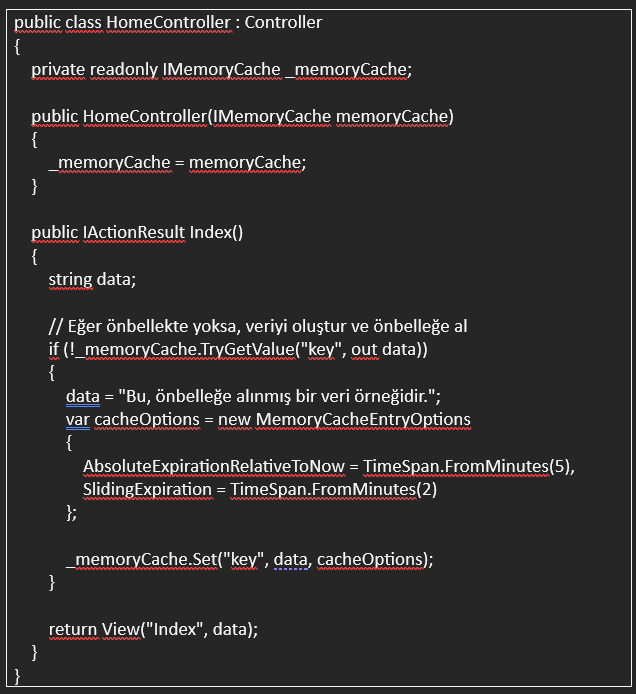

In this example, if the data named “key” does not exist in the cache, a new data is created, cached and kept in memory for the specified time. AbsoluteExpirationRelativeToNow allows data to be stored for 5 minutes while providing "transition: 0.3s;">SlidingExpiration if the user accesses the data extends the time by 2 minutes.
Best Practices in Using IMemoryCache
• Set Data Durations Well: It is important to set the duration correctly according to the data type. It is necessary to determine a short duration for frequently changing data. This , ensures data freshness.• Consider Cache Size: Every data stored in memory takes up some space, so caching large data can quickly consume memory. high In applications with high traffic, the size of the cache should be taken into consideration.• Use Sliding Expiration for Critical Data: Setting sliding expiration on important and frequently used data allows the data to be extended when necessary. Quick access can be provided in response to user requests.• Integrated Usage with Distributed Caching: IMemoryCache is used only when the application is running. If you are working on multiple servers, you can switch to Distributed Cache solutions (such as Redis).

Instant Memory Management: Boost ASP.NET Core Performance with IMemoryCache
IMemoryCache is a structure in ASP.NET Core that provides fast access by storing frequently used data in memory. By keeping the data ready in memory instead of constantly sending requests to the database, it reduces the response time of the application and improves the user experience. It is especially frequently used. Using IMemoryCache in data sets both reduces the database load and provides a fast experience to the user. This tool can be added with a few simple lines of code, and with the correct configuration, you can control the duration and memory retention of the data. IMemoryCache is indispensable for performance optimization in ASP.NET Core applications.

Real World Application: Fast Response Times with IMemoryCache
For example, let's consider the list of the most popular products that users constantly search for on an e-commerce site. This list can be cached with IMemoryCache and presented to users quickly, instead of being pulled from the database each time. Thus, the load on the database is reduced and users get faster results.
IMemoryCache is an ideal tool to increase performance in ASP.NET Core MVC applications. With an effective caching strategy, you can reduce your application's response times and optimize resource usage. By using these techniques, you can both improve the user experience and increase the maintainability of your application.