Web applications these days just require patient waiting. They are no longer platforms that require you to view data by refreshing the page. Instant, where users can interact with real-time data Applications where notifications and data are transmitted quickly are increasingly is more preferred. SignalR, instant communication in .NET Core MVC projects and is an excellent tool for ensuring data flow.
SignalR What is it?
SignalR, ASP.NET Core It is a library integrated with and especially real It is designed to create real-time web applications. SignalR, client by establishing two-way communication between the server and the server, from the server to the clients. It allows you to send instant messages. This is live chat, real timely notifications, multiplayer games or instant data streaming Ideal for situations such as.
SignalR automatically manages connections when they are established. It provides communication between client and server using web socket technology. creates a continuous communication line.
SignalR in .NET Core MVC How to Stream Instant Data with Created?
Creating real-time applications using SignalR Let's examine the steps. This process includes SignalR Hub, SignalR Client, and It consists of Backend Integration stages.
1 . Including the SignalR Package in the Project
First you need to include the SignalR package into your project. It is necessary. For this, use NuGet Package Manager using Microsoft.AspNetCore.SignalR You can install the package:
- Visual Studio: Tools > NuGet Package Manager > Manage NuGet Packages for Solution
- Or Package Manager Console via:
- < o:p>

2. Defining the SignalR Hub
With SignalR To transmit data, you must first create a Hub class. hub, It is the class that manages the communication between clients and the server. For example, a chat A simple hub class to implement could be:
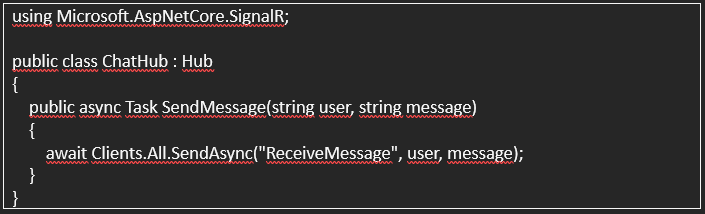
Here, SendMessagemethod sends data from the client will receive it and forward it to all connected clients. If Clients.All.SendAsync this message Used to send to all clients.

3. Configuring SignalR in Startup.cs
In order for SignalR to work correctly, you need to add it to the Startup.cs file. We need to add a few configurations. In this step, open the SignalR hub in MVC we will include in your configuration:
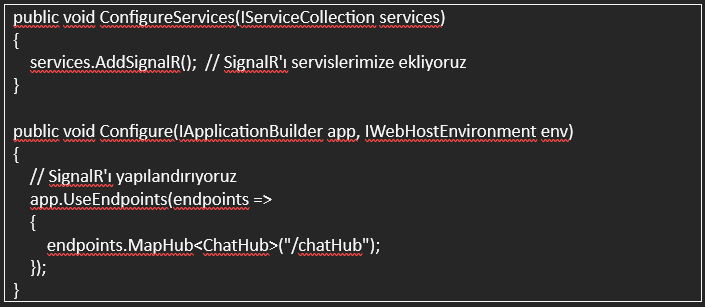
At this stage, you can connect the SignalR hub with a specific URL. We match. For example, connecting to clients using /chatHub we will install it.
4. SignalR Client Side
Now, on the client side, we receive data from the server with SignalR. We need to write JavaScript code to send it. This process requires SignalR to It allows instant data to be sent to the client.
First of all, _Layout.cshtml Let's add the SignalR client library to the file:

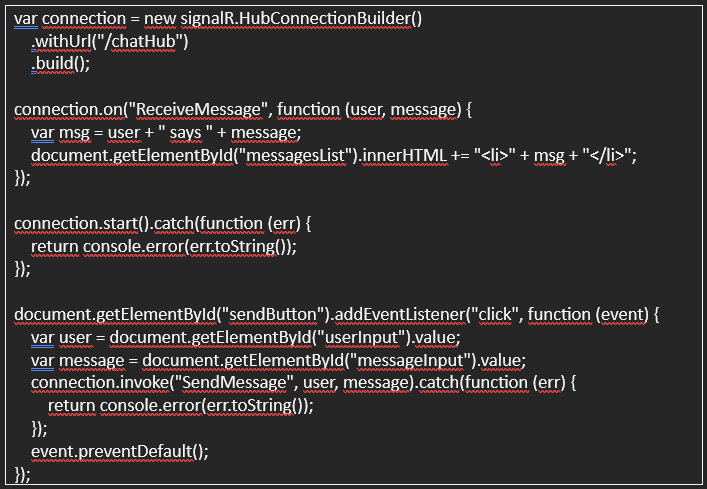
Then, On the client side we can write the following code:
< o:p>
 < o:p>
Here, connection.on("ReceiveMessage", ...) function receives messages from the server and adds them to the HTML page. The data coming from the user is connection.invoke("SendMessage", ...) We send it to the server.
5th Test Do not
Now you can test the instantaneous data flow by running your application. You can. Pretend to be different users by opening two different browsers or tabs and when you send messages at the same time, other users' messages You can be sure that you can see it instantly.

SignalR's Advantages
1. Real-Time Communication: Instantly, without refreshing the web page allows it to receive information.
2. Low Latency: Provides fast data transfer with WebSockets technology.
3. Effective Resource Use: By establishing a constant connection between the server and clients prevents unnecessary requests.
SignalR is used in .NET Core MVC projects, especially for instant data It provides great convenience in applications requiring flow. Real time such as notifications, chat applications, games or live data updates By using SignalR in applications, you can make your users' experience more interactive. and you can make it dynamic. With the steps you learned in this article, .NET Core You can add the ability to pass instant data to your MVC projects.