In the internet world, speed and performance are more important than anything else. Imagine an application that runs at all times. Very important processes that users do not notice continue in the background.

What is this BackgroundService?
BackgroundService, A great feature that .NET Core offers. The main operation of the application continues while tasks that are time-consuming or require constant running are running in the background. makes it work. That is, database maintenance, email sending, reporting A perfect solution for tasks such as operations.
For example, order confirmations or a constantly running background service to send client emails you can create All these processes affect the user's experience while using the site. occurs without causing any interruption.

BackgroundService Usage
The first step is to create a new background service. We will use the BackgroundService class for this. In the example below, we start a simple background task:

HereExecuteAsync method is where the service will run. CancellationToken thanks to the process whenever you want you can stop it.
2. Adding to Startup.cs
BackgroundService To activate it, we need to add it to the Startup.cs file. Service DI (Dependency Injection) container we are starting.
< /p>
 < /span>
In this way, While your application is running, your tasks will be active in the background.
3. Truth Example from Life: Sending an Email
A frequently encountered process in e-commerce applications, to send order confirmation or notification e-mails to users. This is it An example showing how we can do the operation in the background:
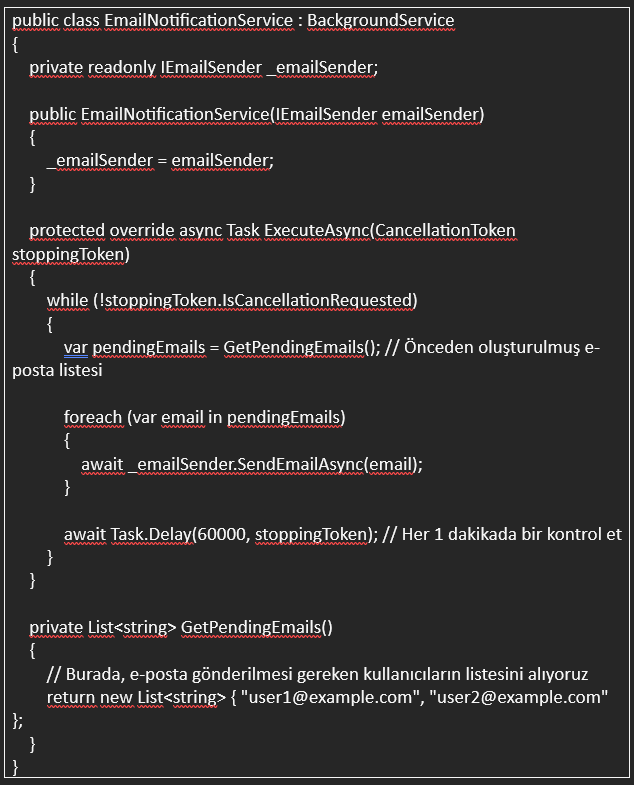
Here, EmailNotificationService class every minute Sending e-mail notifications to users. This is the users website with a task constantly running in the background, even if they are not interacting with is being carried out.
< o:p>

Background Managing Your Tasks
Managing tasks running in the background is very important. Sometimes these tasks need to be done properly to avoid damaging your system. may need to be stopped. Cancel your tasks with CancellationToken or you can schedule background tasks with timers.
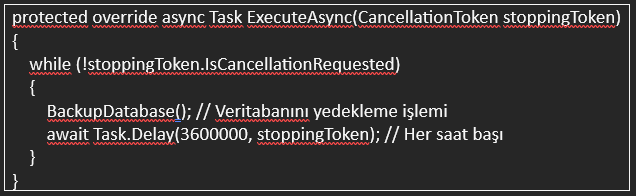
For example, if you want to backup your database, an example to safely stop the process in the background;
 < span style="font-size: 14pt;">
< /p>
 < /span>
Why Should You Use BackgroundService?
Performance Increase: Time-consuming operations does not hinder operation. While users are using your website, they are in the background things are done slowly.
Complex Tasks< /span>: Email sending, data Ideal for processes such as synchronization and reporting.
Data Continuity< /b>: Thanks to background tasks, By providing an uninterrupted service, users always have up-to-date data.
.NET Core MVC will make your application more It is an important step that will ensure fast and efficient operation. Your users Thanks to processes that are constantly running but are not noticed by you, your application is both more and more efficient. It becomes both robust and user-friendly.
< /p>