What is Razor View Engine?
Razor supports HTML and HTML in .NET Core MVC It is a view engine that allows us to create dynamic pages using a combination of C#. If you want, you can pull data from the database, make visual edits with this data and create user-friendly interfaces.
For example, imagine that you want to dynamically display a "Welcome" message along with the user's name. You can do this easily with Razor!
Structure and Simple Usage of Razor
Razor works with the "@" symbol. In other words, you can add C# codes using the @ symbol while in HTML.
Example:

This code is in Model.Name retrieves the stored name and displays it with a "Welcome" message.
Key Components of Razor View Engine
Some basic structures we encounter frequently when working with Razor:
- 1. Model Binding: Razor helps us move model data to the view in .NET Core MVC. possibility
- 2. Layout: It is a page that determines the general structure of your application. By creating a single Layout, you can add elements such as the same title, menu or footer to all your pages.
- 3. Partial View: Again You can use segmented views for sections. For example, instead of rewriting a navigation menu on each page, you can define it in a single Partial View and call it on each page.
< div>
Using Razor View Engine with Examples
1. Basic Razor Syntax

In this example, we get today's date by adding the C# code into the @{} block. We also show it to the user with the @currentTime expression.
2. If-Else Conditions

This loop presents the list of products to the user.

Using Layout and Partial View with Razor View Engine
Creating a Layout Page
A Layout The (Main Layout) page becomes the template for all your pages. You can create the general structure in the Views/Shared/_Layout.cshtml file:
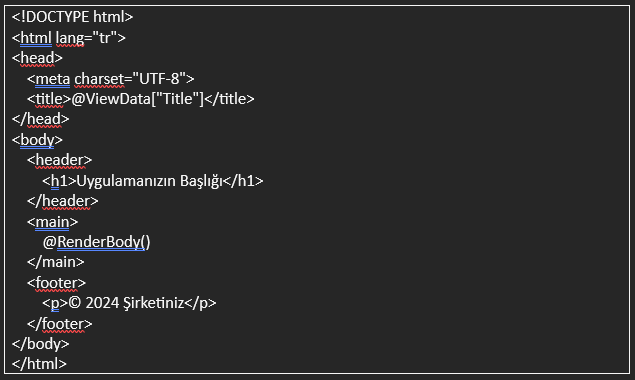
This file contains the top text that repeats on each page. It includes sections such as header and footer. The @RenderBody() section is where the content specific to each page will be displayed.
Partial View Usage
Structures that will be repeated on many pages, such as the navigation menu or product list. It is very practical to use Partial View for For example, create a Views/Shared/_Navigation.cshtml file:
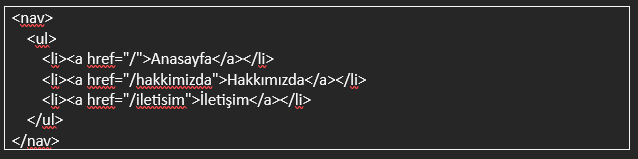
Adding this split view to the main page for:


Why Should We Use Razor View Engine?
- 1. Fast and Efficient: Razor allows you to combine HTML and C# codes and speeds up the development process.
- 2. Dynamic Content: Changing data based on user data or application status. you can easily show the contents.
- 3. Reusable Structures: With Layout and Partial Views, regular and reusable structures in your application
Razor View Engine is the key to creating user-friendly and impressive interfaces in .NET Core MVC. You can create dynamic and aesthetic pages by using HTML and C# together.