Nowadays, many applications are available to users in different languages. needs to meet. This includes localization to ensure multilingual support in applications. It increases the importance of the concept of localization. .NET Core MVC ILocalisationService to provide user-friendly language support in applications is used. In this blog post, we will explain what ILocalisationService is and how to use it. how it works and how it helps you in developing a multilingual application We will explain it with examples.

Localization and Cultural Differences
Localization allows you to use the application in different languages and It is the process of presenting in accordance with cultural norms. For example, an English when you want to offer a German or Turkish version of the application You need to localize. In .NET Core MVC, users' preferred manage texts, date formats, and other cultural content by language ILocalisationService is used for.

ILocalisationService What is it?
ILocalisationService, which provides localization service in .NET Core MVC projects It is an interface. This service translates the texts in your application into various languages. and provides the necessary functions to display the appropriate language according to the user. Texts defined in resource files with ILocalisationService you can capture by specific language and display them in your app.
.NET Core Localization Configuration in MVC
Before you start, localize in the Startup.cs file We need to configure it. These steps enable ILocalisationService It is necessary so that we can use it somehow.
1. Add Required Packages
.NET Core Add Microsoft.Extensions.Localization library You can benefit from its features.

2. Configure ILocalisationService
Startup.cs go to ConfigureServicesmethod below add codes:
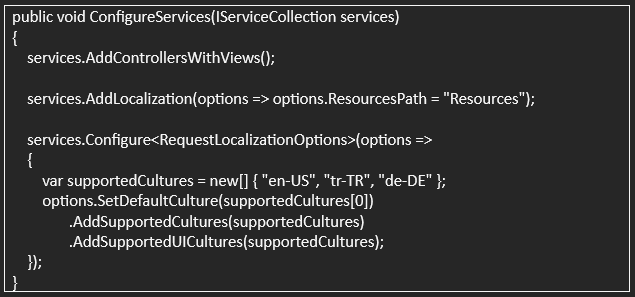
This In the code, localize source files with ResourcesPath We indicate where to find it. In the SupportedCultures section We define the languages that the application will support. In this example, English, Turkish and German languages.
< span style="line-height: 107%;"> 3. ILocalisationService Using in Middleware
Localization Add a call to the Configure method to apply the settings to all requests. We need to add middleware:
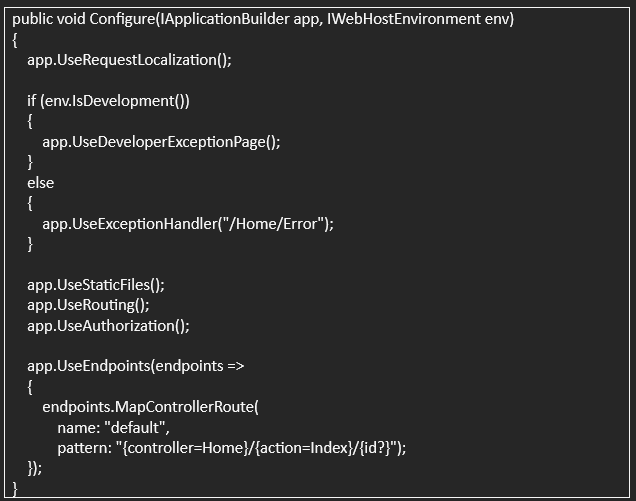
This code conforms to requests using Request Localization Middleware It allows us to load culture settings.
Source Translating Texts with Files
ILocalisationService, Using the .resx files you define in the Resources folder Automatically loads texts based on specific languages. For example, If you want a translation for “HomeController” HomeController.en-US.resx and you should create files like HomeController.tr-TR.resx

1. Resources Create HomeController.en-US.resx file under Controllers in folder and Add text inside like this:
|
Name |
Value |
|
|
WelcomeText |
|
2. Same create HomeController.tr-TR.resx file in the folder and for the same key Add Turkish translation:
|
Name |
Value |
|
WelcomeText |
Welcome to Our Site |
These two The file will extract texts appropriate to the language settings according to the WelcomeText key.

ILocalisationService Using Resources with
HomeController' also using ILocalisationService we can show these texts:
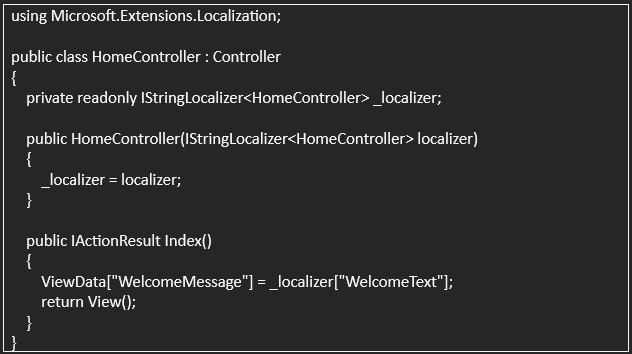
In this code, IStringLocalizer interface localizer["WelcomeText"] We shoot using . So, in the View section, the WelcomeMessage variable It will appear in the language we want.
On view (View) Using Localized Data
Finally, You can use the WelcomeMessagevariable in your view file:

In this way, depending on the language settings“Welcome to our site ” or “Welcome to our site”messages appear on the screen.
Multilingual Benefits of Providing Support
Multilingual support for your application with ILocalisationService Beyond improving the user experience, adding more global reach and It offers the opportunity to attract users from different cultures to your application. User One of the best ways to provide a friendly experience is in their language. is talking!
Localization Tips for
Move All Static Text to Source Files
Moving text to source files makes it easier for you to manage language support.
2.
Give User Option for Language Selection
Allow users to change languages in the app. In this way, users
They can use the application in the language they prefer.
3. Identify and Test Supported Languages
Choose the languages you will support correctly and test the application thoroughly for these languages.

Providing multilingual support in .NET Core MVC projects, It is very important for the application to reach a wide audience. ILocalisationService, It offers developers a flexible and powerful solution in this regard. above steps User-friendly localization support in your application by following you can provide. Thus, making users feel more special You can highlight your application in the global market while providing